Format input date values that are either of the Date type, or, are
character-based and expressed according to the ISO 8601 date format
(YYYY-MM-DD). Once the appropriate data cells are targeted with columns
(and, optionally, rows), we can simply apply a preset date style to format
the dates. The following date styles are available for simpler formatting of
ISO dates (all using the input date of 2000-02-29 in the example output
dates):
iso:
2000-02-29wday_month_day_year:
Tuesday, February 29, 2000wd_m_day_year:
Tue, Feb 29, 2000wday_day_month_year:
Tuesday 29 February 2000month_day_year:
February 29, 2000m_day_year:
Feb 29, 2000day_m_year:
29 Feb 2000day_month_year:
29 February 2000day_month:
29 Februaryyear:
2000month:
Februaryday:
29year.mn.day:
2000/02/29y.mn.day:
0/02/29
We can use the info_date_style() function for a useful reference on all of
the possible inputs to date_style.
fmt_date(data, columns, rows = NULL, date_style = 2)
Arguments
| data | A table object that is created using the |
|---|---|
| columns | The columns to format. Can either be a series of column names
provided in |
| rows | Optional rows to format. Not providing any value results in all
rows in |
| date_style | The date style to use. Supply a number (from |
Value
An object of class gt_tbl.
Details
Targeting of values is done through columns and additionally by rows (if
nothing is provided for rows then entire columns are selected). A number of
helper functions exist to make targeting more effective. Conditional
formatting is possible by providing a conditional expression to the rows
argument. See the Arguments section for more information on this.
Figures
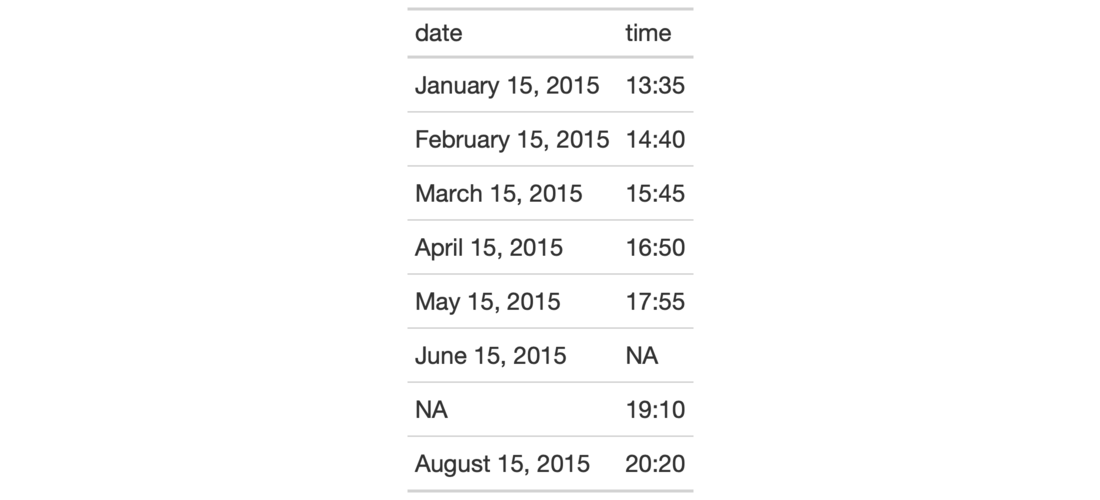
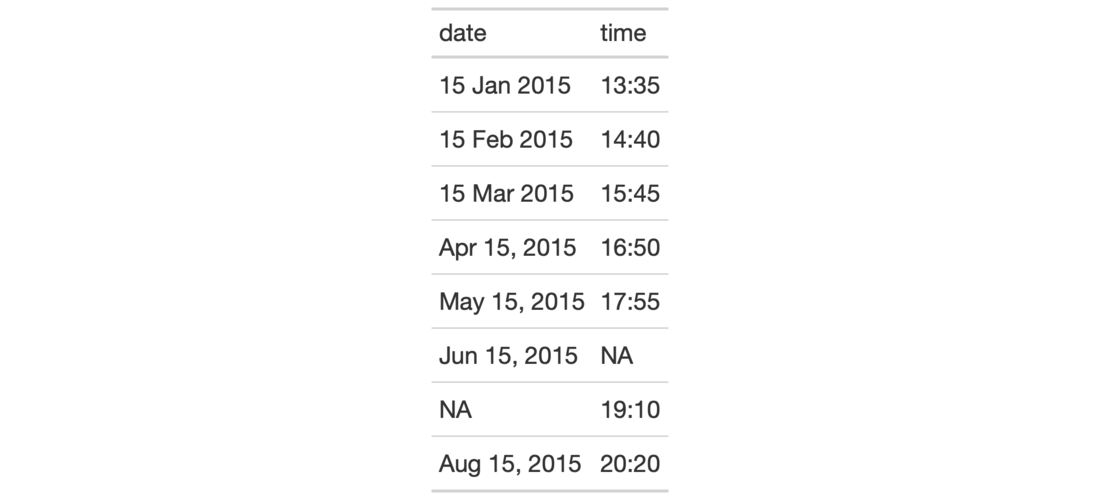
Function ID
3-5
See also
Other Format Data:
data_color(),
fmt_currency(),
fmt_datetime(),
fmt_markdown(),
fmt_missing(),
fmt_number(),
fmt_passthrough(),
fmt_percent(),
fmt_scientific(),
fmt_time(),
fmt(),
text_transform()
Examples
# Use `exibble` to create a gt table;
# keep only the `date` and `time` columns;
# format the `date` column to have
# dates formatted as `month_day_year`
# (date style `5`)
tab_1 <-
  exibble %>%
  dplyr::select(date, time) %>%
  gt() %>%
  fmt_date(
    columns = vars(date),
    date_style = 5
  )

# Use `exibble` to create a gt table;
# keep only the `date` and `time` columns;
# format the `date` column to have mixed
# date formats (dates after April will
# be different than the others)
tab_2 <-
  exibble %>%
  dplyr::select(date, time) %>%
  gt() %>%
  fmt_date(
    columns = vars(date),
    rows =
      as.Date(date) > as.Date("2015-04-01"),
    date_style = 6
  ) %>%
  fmt_date(
    columns = vars(date),
    rows =
      as.Date(date) <= as.Date("2015-04-01"),
    date_style = 7
  )