The cells_footnotes() function is used to target all footnotes in the
footer section of the table. This is useful for adding custom styles to the
footnotes with tab_style() (using the locations argument). The
'footnotes' location is generated by one or more uses of the tab_footnote()
function. This location helper function cannot be used for the locations
argument of tab_footnote() and doing so will result in a warning (with no
change made to the table).
cells_footnotes()
Value
A list object with the classes cells_footnotes and
location_cells.
Overview of Location Helper Functions
Location helper functions can be used to target cells with virtually any
function that has a locations argument. Here is a listing of all of the
location helper functions, with locations corresponding roughly from top to
bottom of a table:
cells_title(): targets the table title or the table subtitle depending on the value given to thegroupsargument ("title"or"subtitle").cells_stubhead(): targets the stubhead location, a cell of which is only available when there is a stub; a label in that location can be created by using thetab_stubhead()function.cells_column_spanners(): targets the spanner column labels with thespannersargument; spanner column labels appear above the column labels.cells_column_labels(): targets the column labels with itscolumnsargument.cells_row_groups(): targets the row group labels in any available row groups using thegroupsargument.cells_stub(): targets row labels in the table stub using therowsargument.cells_body(): targets data cells in the table body using intersections ofcolumnsandrows.cells_summary(): targets summary cells in the table body using thegroupsargument and intersections ofcolumnsandrows.cells_grand_summary(): targets cells of the table's grand summary using intersections ofcolumnsandrowscells_stub_summary(): targets summary row labels in the table stub using thegroupsandrowsarguments.cells_stub_grand_summary(): targets grand summary row labels in the table stub using therowsargument.cells_footnotes(): targets all footnotes in the table footer (cannot be used withtab_footnote()).cells_source_notes(): targets all source notes in the table footer (cannot be used withtab_footnote()).
When using any of the location helper functions with an appropriate function
that has a locations argument (e.g., tab_style()), multiple locations
can be targeted by enclosing several cells_*() helper functions in a
list() (e.g., list(cells_body(), cells_grand_summary())).
Figures
Function ID
7-16
See also
Other Helper Functions:
adjust_luminance(),
cell_borders(),
cell_fill(),
cell_text(),
cells_body(),
cells_column_labels(),
cells_column_spanners(),
cells_grand_summary(),
cells_row_groups(),
cells_source_notes(),
cells_stub_grand_summary(),
cells_stub_summary(),
cells_stubhead(),
cells_stub(),
cells_summary(),
cells_title(),
currency(),
default_fonts(),
escape_latex(),
google_font(),
gt_latex_dependencies(),
html(),
md(),
pct(),
px(),
random_id()
Examples
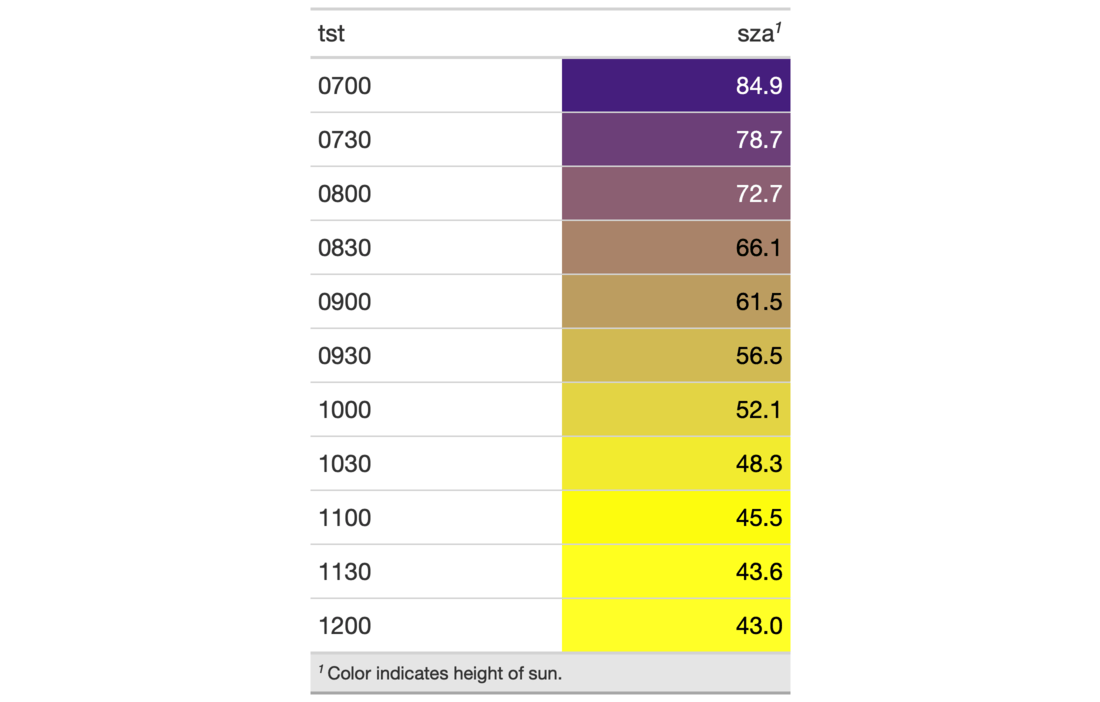
# Use `sza` to create a gt table; color
# the `sza` column using the `data_color()`
# function, add a footnote and also style
# the footnotes section
tab_1 <-
  sza %>%
  dplyr::filter(
    latitude == 20 &
      month == "jan" &
      !is.na(sza)
  ) %>%
  dplyr::select(-latitude, -month) %>%
  gt() %>%
  data_color(
    columns = sza,
    colors = scales::col_numeric(
      palette = c("white", "yellow", "navyblue"),
      domain = c(0, 90)
    )
  ) %>%
  tab_footnote(
    footnote = "Color indicates height of sun.",
    locations = cells_column_labels(
      columns = sza
    )
  ) %>%
  tab_options(table.width = px(320)) %>%
  tab_style(
    style = list(
      cell_text(size = "smaller"),
      cell_fill(color = "gray90")
      ),
    locations = cells_footnotes()
  )